Guides
Best Unblocked .io & Action Games That Run at 60 FPS on School Chromebooks
Tired of lag on 4GB RAM school laptops? Explore the best lightweight .io and action browser games engineered to hold a silky 60 FPS without overheating or dropped frames.
October 21, 20267 min readBy BentoTiles
Best Unblocked .io & Action Games That Run at 60 FPS on School Chromebooks
Action games are only exhilarating when your inputs register instantaneously. The moment your screen drops from 60 frames per second to a choppy 15 FPS, dodging enemy projectiles or aiming a sniper shot becomes an exercise in frustration.
For students gaming on school-issued hardware, lag is a common complaint. Most classroom laptops run on entry-level dual-core processors like the Intel Celeron N4020, N100, or MediaTek MT8183, paired with just 4GB of shared system memory. When forced to execute massive 3D WebGL titles loaded with uncompressed textures, integrated graphics chips quickly throttle.
The solution lies in lightweight HTML5 Canvas and optimized 2D vector architecture. By eliminating heavy shader passes and client-side asset bloat, these action and .io titles maintain a locked 60 FPS on virtually any student Chromebook.
Here are the best unblocked action and .io games ready to play in your browser with zero installs.
Why 4GB RAM Chromebooks Struggle With Heavy WebGL
To understand why some web games feel sluggish while others run silky smooth, look under the hood of ChromeOS:
- Shared Unified Memory: A 4GB Chromebook shares its RAM between the operating system, open browser tabs, and GPU video memory. A game that consumes 1.5GB pushes the system into memory swapping, causing micro-stutters.
- Thermal Throttling on Fanless Laptops: Most student Chromebooks are passively cooled without internal fans. When CPU utilization spikes past 85% for more than a few minutes, the processor automatically clocks down to prevent overheating.
- Optimized Canvas vs. Raw 3D: Games built with 2D HTML5 Canvas rendering execute direct draw calls that integrated Intel UHD or ARM Mali GPUs handle with minimal power draw.
1. Defly.io: Tactical Aerial Territory Combat
Defly.io is a masterclass in modern browser arena design, blending intense dogfighting with tactical map control.

Why It Holds 60 FPS:
- Clean Vector Rendering: Crisp, colorful lines and simple geometry ensure zero rendering bottleneck on budget screens.
- Twin-Stick Style Controls: Pilot your helicopter with
WASDwhile aiming and placing territory nodes with the mouse cursor. - Territory Defense: Build defensive walls to enclose zones, level up your aircraft, and breach rival networks with calculated mortar fire.
2. Gun Spin: Weapon Recoil & Kinetic Momentum
If you crave twitch reflexes and physics comedy, Gun Spin transforms weapon recoil into an addictive flight distance challenge.

Why It's Addictive:
- Impulse Physics Engine: Each trigger pull unleashes realistic Newton's third law recoil that flings your weapon through the air.
- Arsenal Variety: Upgrade from snub-nosed revolvers to pump shotguns, heavy machine guns, and futuristic laser rifles.
- Instant Restarts: Rounds reset in less than one second, creating that irresistible "just one more try" loop before your next class.
3. Tower Crash 3D: Structural Physics Demolition
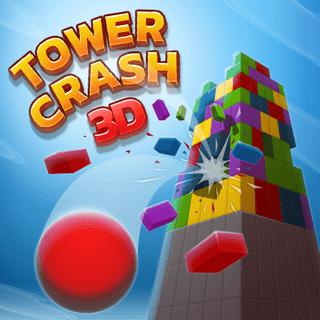
Demolition games are notoriously demanding on system memory, but Tower Crash 3D uses an ultra-efficient lightweight physics engine.
 💥 3D DESTRUCTION
Tower Crash 3D
Aim colored wrecking balls at structural weak points to trigger spectacular 3D physics tower collapses in glorious 60 FPS.
Highlights:
- Target Structural Weak Points: Match colored wrecking balls to tower foundations to trigger cascading structural collapses.
- Optimized Particle Effects: Dynamic dust and debris effects run smoothly without triggering CPU throttling.
- Trackpad Swipe Mechanics: Simple, responsive drag controls make it effortless to aim on Chromebook touchpads.
QUICK JUMP
Curated School Hub
High-Octane Action Hubs
Jump into adrenaline-pumping categories optimized for fast school play:
4. Boss Level Shootout: Retro Bullet-Hell Action
Channel golden-age arcade shooters with Boss Level Shootout, a high-intensity boss-rush game featuring pixel-perfect collision detection.
 💥 BULLET HELL
Boss Level Shootout
Intense retro bullet-hell arcade showdown. Weave through projectile swarms and blast titanic robot bosses with rapid-fire lasers.
Highlights:
- Pattern Recognition: Dodge intricate bullet swarms, predict mechanical laser patterns, and unleash devastating counter-blasts.
- Pixel-Art Aesthetic: Nostalgic 16-bit sprites look razor-sharp on Chromebook displays without taxing your battery.
- Fast Pacing: Designed for quick 3-minute combat encounters.
5. Ufo Run: Hyperspeed Space Obstacle Evasion
Need to test your raw hand-eye coordination? Ufo Run sends an alien saucer through treacherous subterranean tunnels at blistering speed.

Highlights:
- Instant Reaction Demands: Thread needles between lethal laser gates and shifting platforms.
- Smooth Framerates: High-speed scrolling remains crystal clear with zero screen tearing.
How to Optimize Your Chromebook for 60 FPS Action
Follow these quick adjustments to ensure zero lag in fast-paced action titles:
- Verify GPU Hardware Acceleration: Navigate to
chrome://settings/systemand confirm that Use graphics acceleration when available is toggled ON. This offloads canvas rendering to your GPU. - Kill Background Resource Hogs: Open ChromeOS Task Manager (
Search + Esc). Sort by Memory Footprint and terminate background processes from apps like Google Meet or heavy Google Slides presentations. - Keep the Laptop on a Flat Surface: Since student Chromebooks dissipate heat through the bottom aluminum or plastic casing, gaming with the laptop flat on a desk prevents thermal throttling much better than resting it on a blanket or lap.
- Use Chrome's Dedicated Fullscreen Key: Tap the 4th top-row key (fullscreen) or
F11to dedicate 100% of the display buffer to the game canvas.
BROWSE CATALOG
Explore by Category
100% Free • No Downloads
Looking for a specific genre? Jump straight into our top-rated game hubs engineered for Chromebooks and desktop web browsers:
Jump Into the Action on BentoTiles
You don't need a high-end gaming laptop to experience responsive, competitive gameplay. Browse our .io Games collection or test your hand-eye coordination in Skill Games right now!